
← Back to home

Getting Started

Installing BadAvatar

Prepare a USB device, run BadStick, and configure launch.ini for the exploit.

Downloading the app

  • Start by plugging your flash drive into your computer and downloading BADSTICK.
  • Extract the zip to a safe location and open the app.
  • Windows may flag it as a suspicious app. Ignore it and open the app. It's safe.
  • The app will check for updates. Once it is done, press Continue.

Setting up the app

  • Start by clicking BadAvatar under Exploit Methods in the upper-right corner of the app.
  • Then select Skip XeXmenu under Settings.
  • Select your flash drive at the bottom of the screen, then click Start.
Guide image

Setting up launch.ini

  • Once the flash drive is set up, you will get a message saying BadStick has finished setting up your device. Now you need to add the config file for the exploit.
Guide image

On the root of your flash drive, make a file called launch.ini, copy the code below into it, and save it.

The file extension should be .ini. It should not be named launch.ini.txt.


  [Paths]
  BUT_A = 
  BUT_B = 
  BUT_X = Usb:\Content\0000000000000000\C0DE9999\00080000\C0DE99990F586558
  BUT_Y = Sfc:\dash.xex
  Start = 
  Back = 
  LBump = 
  RThumb = 
  LThumb = 
   
  Default = 
   
  Guide = 
   
  Power = 
   
  Configapp = 
   
  Fakeanim = 
   
  Dumpfile = 
   
  [Plugins]
  plugin1 = 
  plugin2 = 
  plugin3 = 
  plugin4 = 
  plugin5 = 
   
  [Externals]
  ftpserv = false
  ftpport = 21
  updserv = false
  calaunch = false
  fahrenheit = false
   
  [Settings]
  nxemini = true
  pingpatch = true
  contpatch = false
  xblapatch = false
  licpatch = false
  fatalfreeze = false
  fatalreboot = false
  safereboot = true
  regionspoof = false
  region = 0x7fff
  dvdexitdash = false
  xblaexitdash = false
  nosysexit = false
  nohud = false
  noupdater = true
  debugout = true
  exchandler = true
  liveblock = true
  livestrong = true
  remotenxe = false
  hddalive = false
  hddtimer = 210
  signnotice = false
  autoshut = false
  autooff = false
  xhttp = false
  tempbcast = false
  temptime = 10
  tempport = 7030
  sockpatch = true
  passlaunch = false
  fakelive = false
  nonetstore = true
  shuttemps = false
  devprof = false
  devlink = false
  autoswap = false
  nohealth = true
  nooobe = true
  autofake = false
  autofake0 = 0x00000000
  autofake1 = 0x00000000
  autofake2 = 0x00000000
  autofake3 = 0x00000000
  autofake4 = 0x00000000
  autofake5 = 0x00000000
  autofake6 = 0x00000000
  autofake7 = 0x00000000
  autofake8 = 0x00000000
  autofake9 = 0x00000000
  autocont = false

Booting the exploit

  • With the flash drive in your Xbox, boot the console.
  • You will boot to the avatar screen. You should see a new avatar named BadAvatar and get a notification.
  • Do not select any avatars. You may move around this screen to make sure your console hasn't frozen, but do not select an avatar.
  • After about 30 seconds, you should get the XeUnshackle chains-breaking animation. This means you have successfully exploited your console.
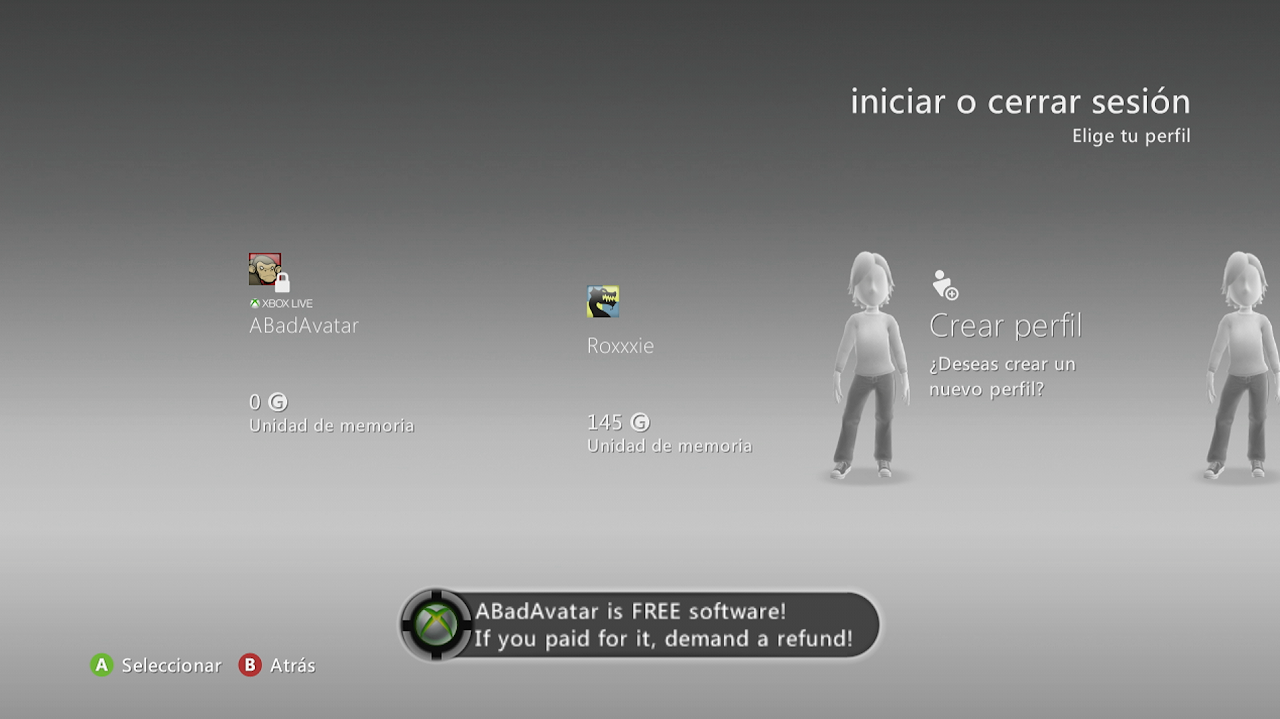
Guide image